- TESTED one walk-through of the whole room, 2026-11-04
- IN-GAME SET OPENING HOURS, PICK UP, CASH REGISTER, DISPATCH — the hover labels
- OFFICIAL ONLY the portal describes a shop without naming a single fixture
- NEEDS CHECK whether the room can be rebuilt or extended, and what the ceiling lights are for
The front: door, windows, board
The entrance is a glass frontage with a door that does not need opening — you
walk through it. Outside, on the pavement, stands the A-frame board that
carries your opening hours: OPEN 12:00 to 20:00 by default, editable with the
SET OPENING HOURS panel behind it.
The windows matter more than they look. Customers arrive from the street side, and the queue that forms at the counter is visible through them from outside, which is how you can tell a busy moment from a dead one without opening a menu.
The floor: shelves and boxes
The selling floor is tiled, and the shelves stand on it wherever you put them.
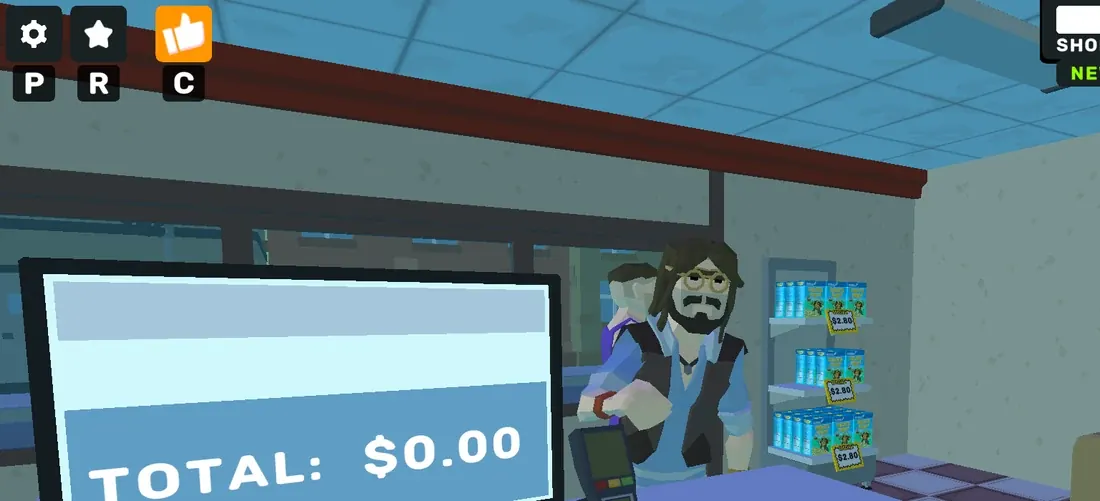
Each shelf holds a small number of units and prints a yellow price tag at its
edge — $0.99 for the milk we stocked, $2.80 for the blue cans. The tag is the
only place in the room that states a price.
Deliveries arrive as cardboard boxes on the floor. A box has three states and
one label each: PICK UP when the crosshair is on it, an open lid after E, and
an empty carton you have to carry out. Nothing suggests the boxes can be stored —
they sit where they land until you deal with them.
The counter: screen, terminal, drawer
The counter is the money end of the room and it has three parts:
- A monitor facing the player that prints
TOTAL: $0.00when idle and the fullGIVE THE CHANGEarithmetic when a customer is being served. - A card terminal standing on the counter, which is where the payment is actually taken.
- The drawer, which is the panel that appears on the right of the screen with five bills and five coins.
The hover label over the counter area reads CASH REGISTER, so the game treats
the whole assembly as one fixture with one name.
The back: the computer desk
Behind the counter, against the wall, is a desk with a PC tower and monitor.
Sitting at it opens the ordering terminal — Shop, Licenses, Services,
Employees, and a cart. This is the only place wholesale prices are printed, and
the only place a product can be bought.
It is also the only screen in the room that is not about the customer in front of you, which makes it the thing you use when the shop is empty and the thing you cannot use while a queue is building.
Outside: the bin
One object matters outside the shop: the bin, where the empty carton goes.
The tutorial will not clear its objective until the box is in it, which is the
game's way of telling you that rubbish is a mechanic rather than decoration —
the reputation help card lists Dirty store as a way to lose standing.
What the room does not have
No stockroom, no back door, no staff area, no expansion corridor that we could find. What you buy in furniture goes into this one room, and the room is the whole map.
What we have not confirmed
Whether the floorplan can be changed, whether shelves can be moved once placed, what the ceiling lights do, and whether a second room unlocks at a higher level. All four are visible questions in the client and none of them were answered by walking around it.
Last checked against the client: 2026-11-04 · client web build 2026-11-04